
- Software Mansion just shipped SimCam, a Mac app that registers as a system-level virtual camera for the iOS Simulator.
- Stream your webcam, inject images and videos, or generate QR codes on the fly — no app code changes, works with SwiftUI, UIKit, React Native and Flutter.
- $19 lifetime, launched April 23, 2026.
TL;DR
SimCam is a new Mac app from Software Mansion — the studio behind React Native Reanimated and Radon IDE — that lets you test camera-dependent iOS apps directly in the Simulator. It installs a system-level virtual camera, so your app sees a real camera through plain AVFoundation with zero code changes. Launched April 23, 2026. Pro license is a one-time $19.
What's new
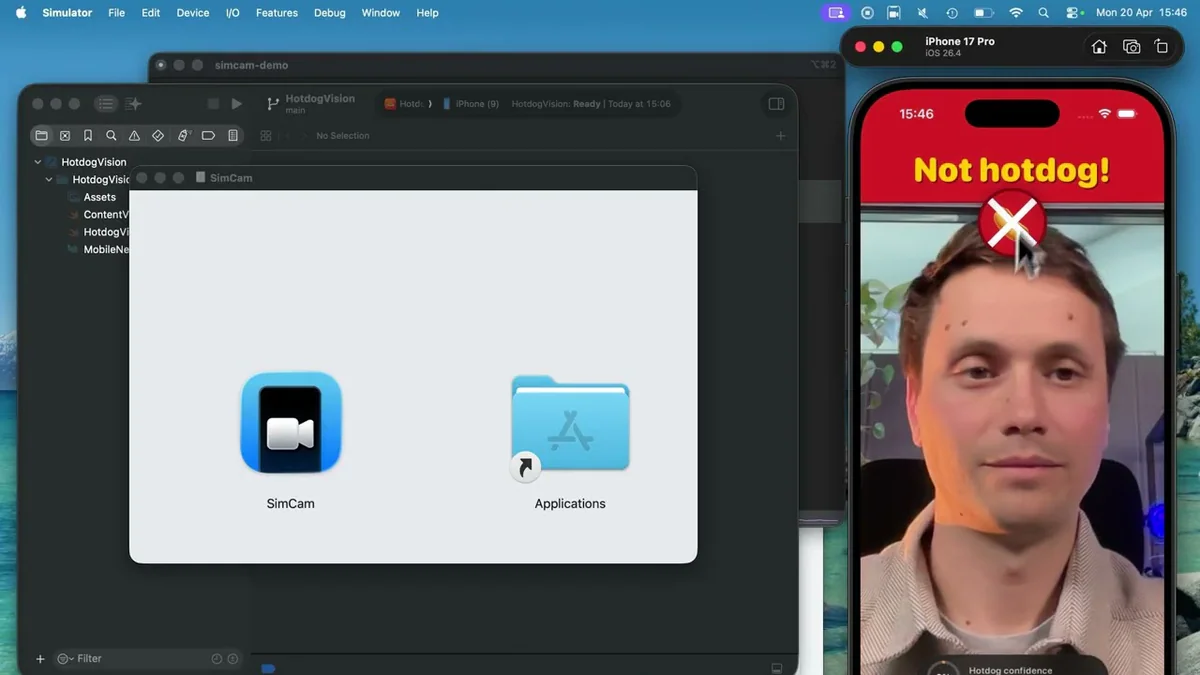
The iOS Simulator has always had a blind spot: no camera. For a decade, every team building a card scanner, QR-login flow, AR filter, or video-call app has had to sideload to a physical iPhone for every camera test. SimCam closes that gap.
- Four source modes: live stream from your Mac's built-in or external camera, static image injection, video file playback, and programmatic QR code generation.
- Zero-code integration: registers as a system-level virtual camera. Your app reaches it through the same
AVFoundationAPI it would use on a real device. - Front & back camera switching — a feature even the popular RocketSim camera feature doesn't solve yet.
- CLI (
simcamctl): switch sources from the terminal, a script, or an AI agent. The docs explicitly call out "agent support."
Why it matters
Camera testing is where the mobile dev loop breaks down. A physical-device round trip costs two to five minutes; multiply that by a hundred iterations on a card-scanner's crop logic and you've lost a day. SimCam pulls that loop back into the Simulator where it belongs. Two details punch above the product's weight:
- No app patch required. Previous OSS attempts like iCimulator needed you to swap your camera code for a mock. SimCam lives one layer deeper — inside macOS's camera subsystem — so production code paths actually exercise.
- A CLI built for agents. Dropping
simcamctl set-source --qr "AUTH_TOKEN_XYZ"into a Maestro flow or a Claude-driven test agent makes QR auth, KYC document capture, and barcode scans deterministic for the first time.
Technical facts
Quick command examples from the landing page:
simcamctl set-source --qr "AUTH_TOKEN_XYZ"
simcamctl set-source --image mock.png
simcamctl set-source --video clip.mov
Verified compatibility:
- Native: SwiftUI, UIKit.
- Cross-platform: React Native, Flutter.
- Libraries tested: Google WebRTC, Agora, Fishjam,
react-native-vision-camera(≥5.0),expo-camera(≥55.0.11).
Still requiring app-side patches: react-native-vision-camera below 5.0, expo-camera below 55.0.11, react-native-webrtc (all versions), and some hardware-H.264 WebRTC/Agora flows. Resolution is inherited from the Mac camera rather than the simulated device — a constraint shared by every sim-camera tool on the market.
Comparison
| Capability | SimCam | RocketSim | iCimulator (OSS) | Sauce Labs |
|---|---|---|---|---|
| Live Mac camera stream | Yes | Yes | Yes | No |
| Image injection | Yes | Partial | Yes | Yes |
| Video injection | Yes | Partial | Yes | No |
| QR code generator | Yes | No | No | No |
| Front/back switch | Yes | No | Yes | Yes |
| Zero code changes | Yes | SDK needed | Code swap | Cloud only |
| CLI / agent control | Yes | No | No | API |
| Pricing | $19 lifetime | Subscription | Free OSS | Enterprise SaaS |
Use cases
- KYC & card scanners: inject a canned PNG of a passport or credit card so the crop & OCR pipeline sees the exact same pixels every run.
- QR login flows: one CLI call wires an auth QR into the simulator's camera — game-changer for E2E suites.
- AR / CV apps: replay bug-repro videos deterministically instead of chasing them in the real world.
- WebRTC & video calls: develop against a live stream without a device reboot loop.
- AI test agents: hand a Claude- or MCP-driven agent a predictable camera input surface.
- Demo videos: record a Product Hunt walkthrough by looping a staged clip through the simulator's camera.
Limitations & pricing
Two tiers:
- Trial (free): built-in demo video only. Enough to verify your app sees a camera, not enough to test a real flow.
- Pro ($19, one-time): all four sources, front/back switching, CLI, and 12 months of free updates.
Known limitations: resolution is tied to the Mac camera (not the simulated device spec), react-native-webrtc and some hardware-H.264 WebRTC/Agora paths still need app-side patches, and Apple Vision framework support in the Simulator remains patchy on Apple's side — a gap SimCam inherits.
What's next
12 months of free updates ship with Pro, so expect active iteration on library compatibility (vision-camera, expo-camera, WebRTC) and broader iOS-version coverage. Given Software Mansion also ships Radon IDE and deep Maestro integration, a tighter test-automation story feels inevitable — even if no joint release has been announced. For now, $19 gets you back the day a week you were losing to "plug in my iPhone."
Source: simcam.swmansion.com, @swmansion launch tweet, software-mansion/simcam.app.