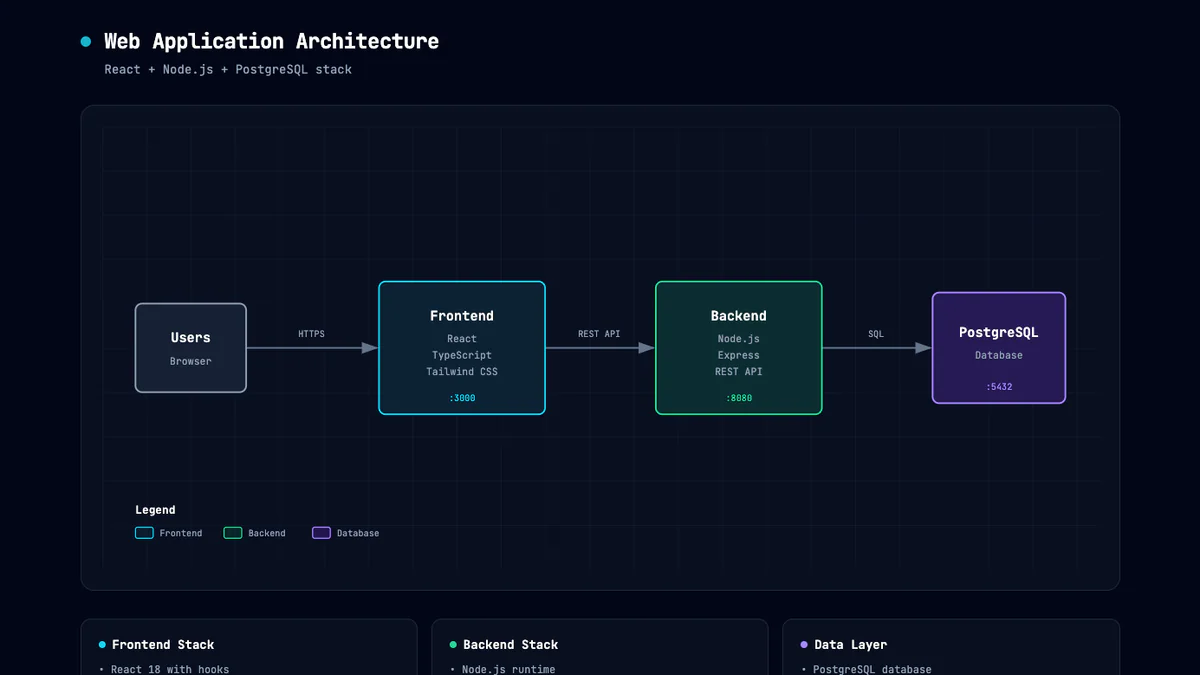

- Cocoon AI vừa open-source một Claude skill biến mô tả plain-English thành file HTML tự chứa với SVG inline, dark theme slate-950, JetBrains Mono, zero dependency.
- Mô tả kiến trúc → Claude xuất file, mở ngay trong browser.
TL;DR
Cocoon AI vừa phát hành Architecture Diagram Generator — một Claude skill mã nguồn mở (MIT) giúp bạn viết mô tả hệ thống bằng tiếng Anh thường, Claude trả về một file .html tự chứa với SVG inline + CSS embedded, dark theme slate-950, font JetBrains Mono, zero JavaScript, zero dependency. Mở bằng browser bất kỳ, share bằng cách gửi 1 file. Dự án đã đạt ~2.5k stars GitHub trong vài tuần.
What's new
Thay vì mở draw.io rồi kéo thả 30 box, hoặc viết Mermaid rồi chửi khi arrow route xấu, bạn chỉ cần mô tả:
"NextJS + Shadcn frontend, PostgreSQL, hosted trên Vercel, Cloudflare cho file storage, Stripe payment, Resend email."
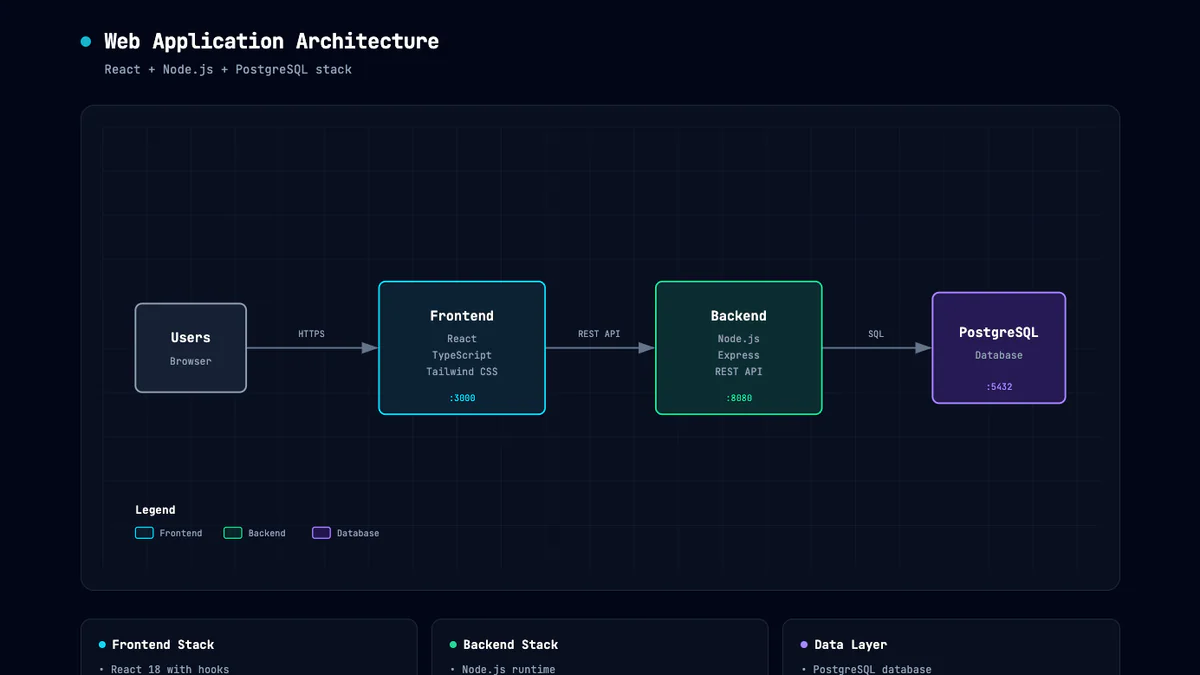
Claude xuất luôn một file HTML với diagram render đẹp đúng kiểu production-grade. Muốn sửa? Chat tiếp: "thêm Redis giữa API và DB" hoặc "fix mấy mũi tên bị chồng, dùng curved arrow" — Claude cập nhật realtime.
Điểm thú vị là skill có thể chĩa vào cả codebase local hoặc public GitHub repo để auto-extract kiến trúc. AlphaSignal thử với repo "GBrain" của Garry Tan — output sạch hơn hẳn diagram gốc trong repo.
Why it matters
Diagram kiến trúc là thứ dev nào cũng cần khi handover, onboarding, hay viết README — nhưng ít ai làm vì tốn thời gian. Các tool hiện có đều vướng:
- Mermaid: text-based nhưng theme mặc định xấu, arrow routing cứng, khó custom.
- draw.io / Lucidchart: kéo thả thủ công, không AI, tier xịn phải trả tiền.
- Excalidraw: aesthetic hand-drawn, không hợp với production doc.
Skill này target khoảng giữa: AI-native + aesthetic production-ready, consistent across diagrams nhờ design system được bake sẵn vào prompt.
Technical facts
Đây là chỗ skill khác với "AI làm hộ" thông thường — tác giả đã viết rất kỹ rules trong SKILL.md để Claude tuân thủ design system nhất quán:
Output format
- Một file
.htmlduy nhất, embedded CSS, inline SVG, pure CSS animations — không cần JS. - Dependency bên ngoài duy nhất: Google Fonts để load JetBrains Mono.
- Mở trực tiếp trong browser, share qua file, export PDF, host trên static site đều được.
Design system
- Background:
#020617(slate-950) + subtle grid pattern 40px. - Typography: JetBrains Mono — 12px component name, 9px sublabel, 8px annotation, 7px tiny label.
- SVG viewBox: ~1000×680, scale responsive tới ~1100px.
- Component boxes: rounded
rx="6", stroke 1.5px, fill semi-transparentrgba(..., 0.4). - Security groups: dashed
stroke-dasharray="4,4", rose. - Region boundaries: dashed
stroke-dasharray="8,4", amber,rx="12".
Semantic color coding
| Component | Color | Dùng cho |
|---|---|---|
| Frontend | Cyan #22d3ee | Client app, UI, edge device |
| Backend | Emerald #34d399 | Server, API, service |
| Database | Violet #a78bfa | DB, storage, AI/ML |
| Cloud/AWS | Amber #fbbf24 | Cloud service, infra |
| Security | Rose #fb7185 | Auth, security group, encryption |
| Message bus | Orange #fb923c | Event bus, queue connector |
| External | Slate #94a3b8 | Generic / external system |
Z-order & spacing rules
Điểm technical đáng nể: skill prompt ép Claude vẽ arrow trước (z-order thấp hơn box), rồi đặt một rect opaque #0f172a bên dưới box semi-transparent để mask arrow — nhờ vậy đường kết nối không bị lộ xuyên qua fill mờ. Spacing rule cứng: service box 60px (hoặc 80–120px cho box lớn), gap dọc tối thiểu 40px giữa các component, legend BẮT BUỘC nằm ngoài tất cả boundary box (≥20px dưới boundary thấp nhất).
Comparison
Sources không benchmark trực tiếp với Mermaid / draw.io / Excalidraw. Tác giả bài AlphaSignal (đã thử qua vài diagram generator) đánh giá: "by far the most elegant-looking" — khen intentional spacing, dark theme, presentation-ready không cần cleanup.
Góc nhìn thực tế:
- vs Mermaid: skill cho aesthetic đẹp hơn nhiều, nhưng bạn mất dạng text DSL — output là HTML không dễ diff trong PR.
- vs draw.io: nhanh hơn ~20×, nhưng không có control pixel-level.
- vs Excalidraw: aesthetic trái ngược — production-grade thay vì hand-drawn.
Use cases
- README & docs: paste HTML hoặc export PDF, diagram luôn render nhất quán.
- Project handoff / onboarding: dev mới hiểu hệ thống trong 5 phút.
- Stakeholder deck: drop vào slide không cần cleanup.
- Reverse engineer repo: chĩa skill vào public GitHub repo → diagram tức thì.
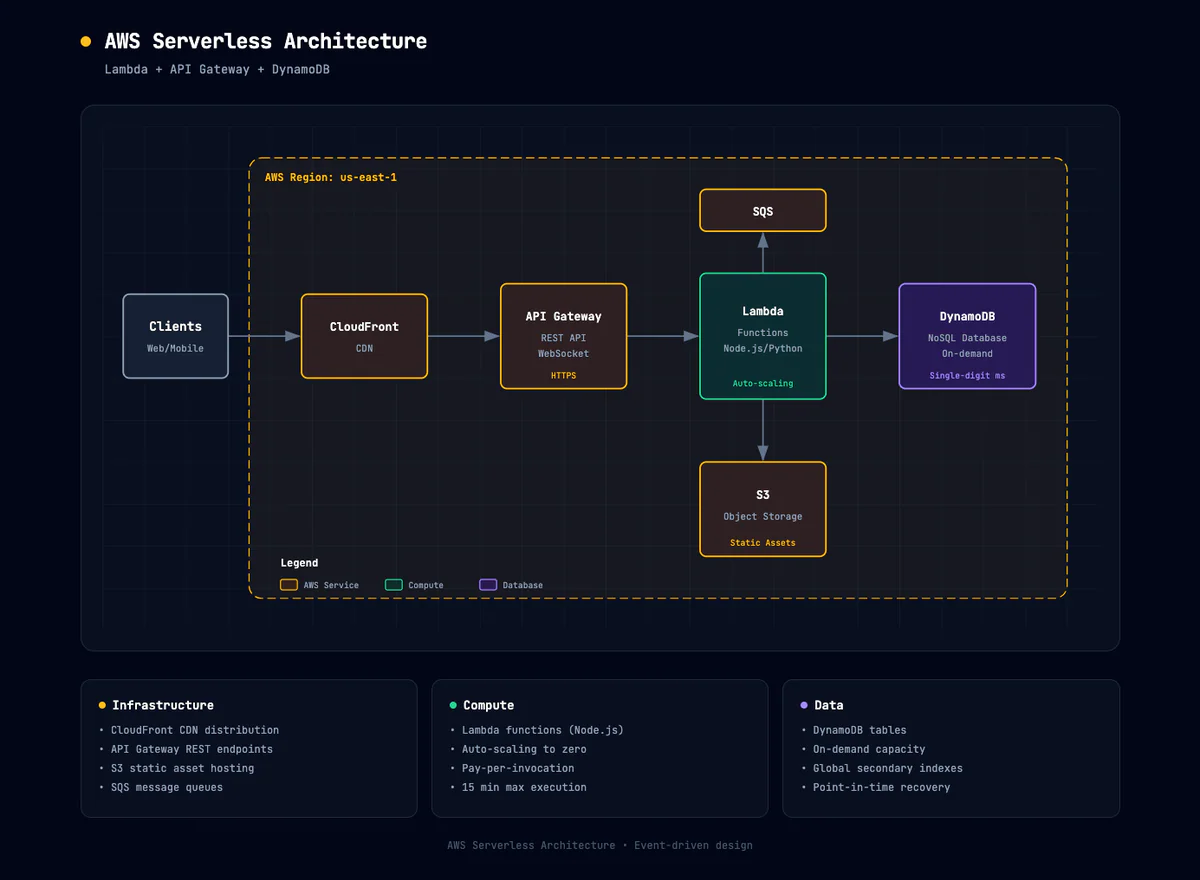
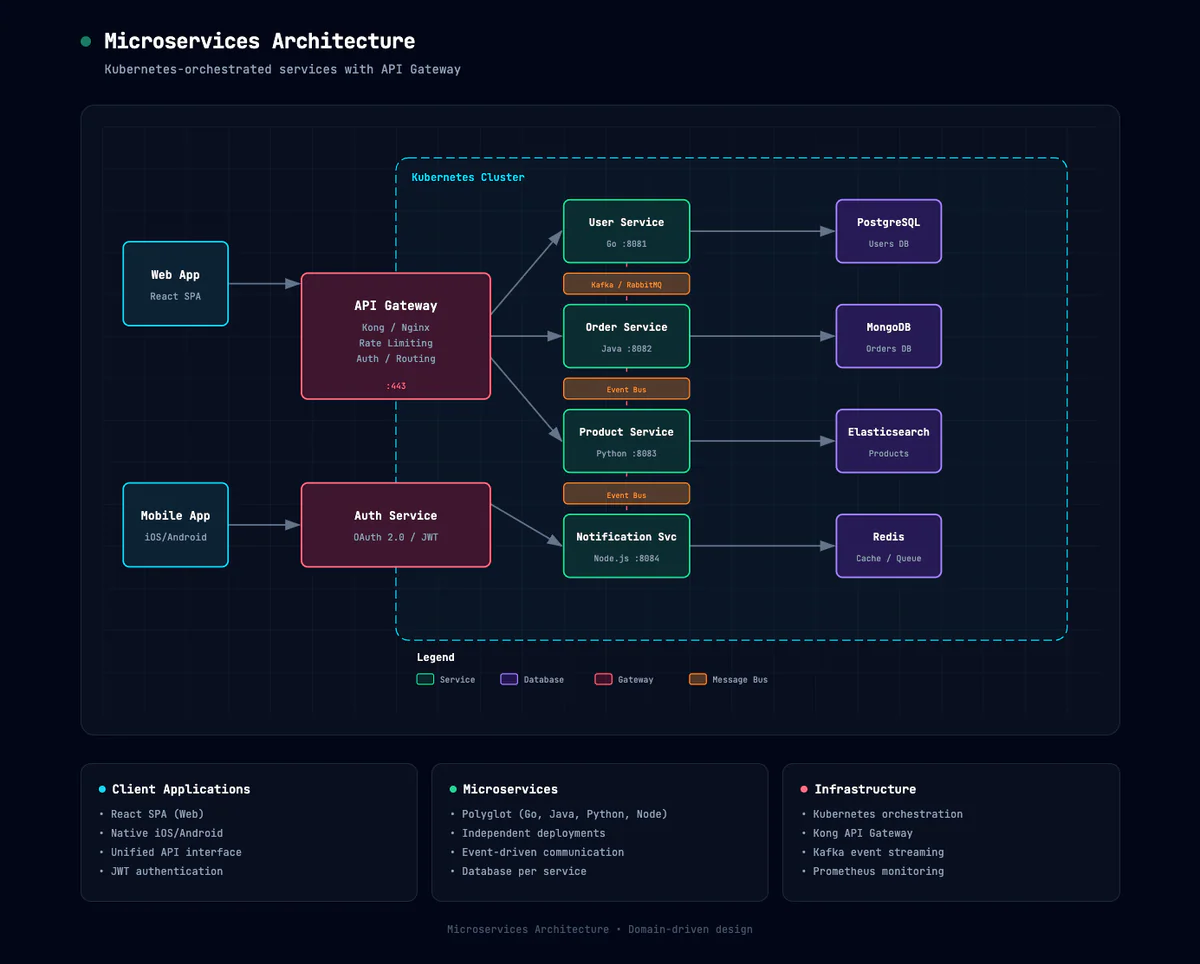
- Templates sẵn có: web app (React+Node+Postgres), AWS serverless (Lambda+API GW+DynamoDB), microservices (Kubernetes+API GW).
Skill đã được bundle sẵn vào Hermes agent của Nous Research — cho thấy pattern ship-out-of-the-box cho các agent framework khác.
Limitations & pricing
- Subscription gate: skill MIT free, nhưng để chạy cần Claude Pro, Max, Team, hoặc Enterprise. Free plan không xài được.
- AI quirks: lần generate đầu đôi khi arrow overlap hoặc placement hơi lệch — thường 1 follow-up ("fix overlapping arrows, use curved") là xong.
- Không có layout engine cứng: layout emerge từ prompt + rules, không phải auto-layout (dagre / ELK). Với 10–30 component thì ổn, topology phức tạp hơn cần iterate nhiều vòng.
- Aesthetic lock-in: bạn sẽ được Cocoon dark theme. Muốn light theme / brand theme phải fork và sửa
SKILL.md.
What's next
Skill đã ~2.5k stars, chấp nhận issue + PR. Chưa có roadmap chính thức — hướng cộng đồng đang đi: bug fix, thêm layout pattern, có thể thêm light theme. Cài đặt mất 3 bước: download architecture-diagram.zip → Settings → Capabilities → Skills → + Add → toggle on. Hoặc extract vào ~/.claude/skills/ nếu xài Claude Code CLI.
Nguồn: Cocoon-AI/architecture-diagram-generator, AlphaSignal, Camille Roux on X.
Đạo hữu là phàm nhân, tu tiên giả
... hay AI cào nội dung?
Tất cả nội dung tại đạo quán đều miễn phí. Đạo hữu chỉ cần nhập email của mình để đọc tiếp. Nói KHÔNG với Spam. Huỷ subcribe lúc nào đạo hữu thích.
nếu không muốn nhận newsletter thì có thể nhập mail phụ