

- Hermes Agent có built-in cron scheduler bằng ngôn ngữ tự nhiên - không cần viết cron expression.
- Researcher agent gửi daily digest AI/ML mỗi 8 giờ sáng tự động.
- Designer tự học visual style từ reference images và encode thành skill.
- Programmer delegate sang Claude Code để tận dụng Max subscription.
TL;DR
Hermes Agent ship với built-in cron scheduler: mô tả lịch bằng tiếng Anh thông thường, agent tự convert sang cron job và chạy unattended. Researcher agent gửi daily AI/ML digest qua Telegram mỗi sáng mà bạn không cần bật máy. Designer học visual style từ reference images và tự tạo skill để reproduce style đó. Mọi scheduled job survive restart, log ra ~/.hermes/cron/output/.
Cron bằng tiếng tự nhiên
Hermes ship với built-in scheduler. Gateway daemon tick mỗi 60 giây, chạy các job đến hạn trong isolated agent sessions, và deliver output đến messaging platform bạn chỉ định. Jobs survive restarts, lưu trong ~/.hermes/cron/jobs.json, output đến ~/.hermes/cron/output/.
Điểm thú vị: bạn không cần viết cron expression. Mô tả bằng tiếng Anh và Hermes tự convert.
Một vài patterns hữu ích:
- One-shot delays:
/cron add 30m "Remind me to check the build"- chạy một lần sau 30 phút - Recurring intervals:
/cron add "every 2h" "Check server status"- chạy mỗi 2 giờ - Standard cron expressions:
/cron add "0 9 * * 1-5" "..."- weekdays 9am, khi cần control chính xác - Skill attachment:
/cron add "every 1h" "Summarize new feed items" --skill blogwatcher- load skill trước khi chạy
Bạn cũng có thể chain jobs: output của cron này trở thành input của cron tiếp theo qua context_from flag. Hữu ích cho multi-stage automation: research step feed writing step.
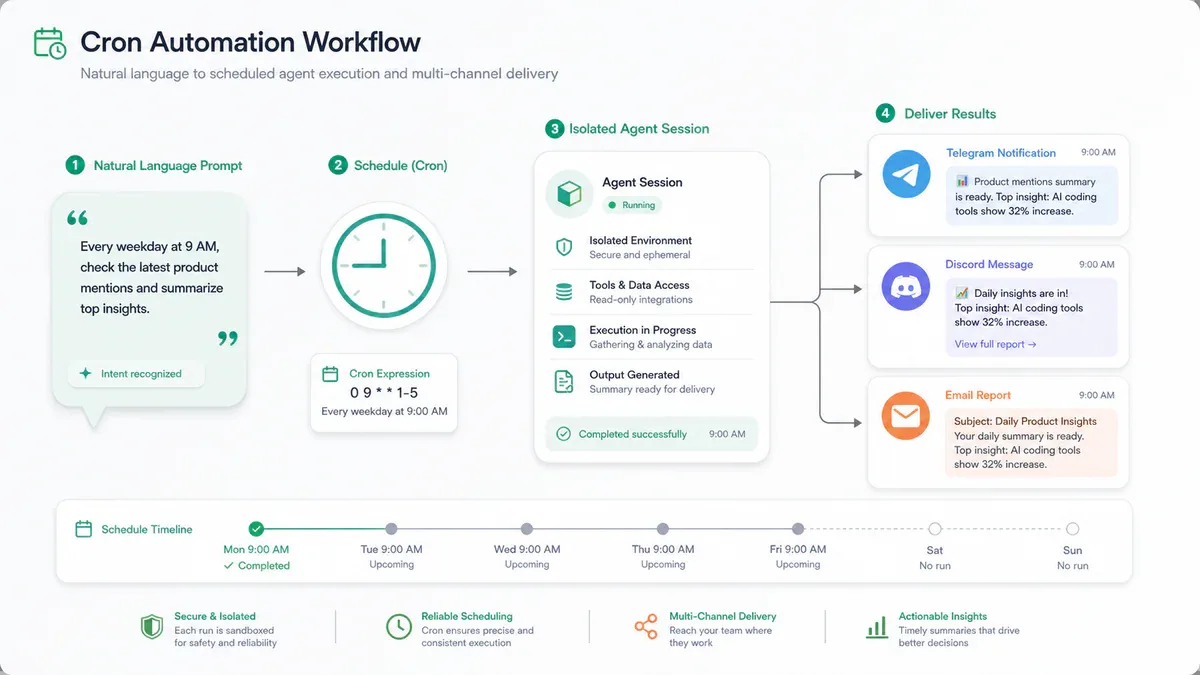
Researcher agent - Daily digest AI/ML tự động
SOUL.md của Researcher đã định nghĩa nhiệm vụ: daily digest AI/ML. Bây giờ cần một cron job chạy nó tự động.
Open session với researcher và gửi prompt này:
Every weekday at 8am India time, prepare a deep digest of what's new
in the AI and machine learning space over the last 24 hours. Cover
four streams in this order:

1. Trending GitHub repos (especially new AI/ML tooling)
2. Big tech and lab announcements (Anthropic, OpenAI, Google, Meta,
   xAI, Nous, etc.)
3. Fresh research papers worth reading
4. Social pulse from X, Reddit, and Hacker News

Lead with what changed since yesterday. Cite every claim with a URL.
Keep it under 800 words. Deliver to Telegram.

Set this up as a recurring cron job.
Researcher tạo job bằng cronjob tool, delivery target default vào chat hiện tại (Telegram), và scheduler take over từ đó. Verify:
hermes -p researcher cron listBạn sẽ thấy job với next scheduled run time. Sáng mai 8 giờ, Telegram của bạn có digest. Không cần làm gì thêm.
Designer - tự học visual style từ reference images
Designer agent trở nên genuinely useful khi nó có thể generate images trong style của bạn, không phải generic AI output. Pattern: feed reference designs, để nó study, yêu cầu nó tạo skill encode pattern đó.
Đây là self-improving loop được dùng như setup mechanism: thay vì tự viết skill bằng tay, bạn show agent good examples và yêu cầu nó encode pattern thành SKILL.md.
Start session với designer, paste reference images (drag-and-drop trong CLI, hoặc attach trong Telegram), rồi gửi:
Carefully study these reference illustrations. Note the color palette,
line weight, level of detail, composition, and overall aesthetic.

I want you to create a new skill called "my-design-style" that captures
this visual style. The skill should:

1. Document the style fingerprint in plain language
2. Include a Python script that takes a text description and generates
   the image in this style
3. Read OPENROUTER_API_KEY from the environment

Use skill_manage to create it. Test the generated script before saying done.
Designer sẽ study references, viết SKILL.md, generate Python script, lưu vào ~/.hermes/profiles/designer/skills/my-design-style/, và verify script chạy được. Từ đó, mỗi khi yêu cầu illustration mới, designer trigger skill và generate image theo style đã học.
Pattern này work với bất kỳ style-specific output nào: newsletter intros, X threads, code review comments - bất cứ thứ gì cần consistency.
Mỗi profile cần Telegram bot riêng
Telegram chỉ cho phép một connection per token. Share token giữa nhiều profile sẽ break. Cần chạy /newbot ba lần với BotFather và lưu ba tokens:
hermes -p designer gateway setup
hermes -p programmer gateway setup
hermes -p researcher gateway setup
Setup giống hệt regular agent - tạo bot mới trong BotFather rồi kết nối vào profile tương ứng. Kết quả: ba Telegram bot riêng biệt, mỗi bot có personality và memory của agent đó.
Chi phí và chọn model phù hợp
Hermes miễn phí hoàn toàn (MIT license). Chi phí thực tế là API cost:
- Budget automation: Qwen 3.5/3.6 (miễn phí trên OpenRouter), GLM-5.1, Kimi K2.5 - khoảng $1-3/ngày
- Daily driver: GPT 5.4 thinking mode medium hoặc MiniMax M2.7
- Quality-sensitive work: Claude Opus 4.6 - đắt nhất, best agentic performance, có thể lên $130+/ngày với heavy use
Fix: dùng aggressive session resets và chọn model phù hợp với tier task. Budget model cho scheduled automation, quality model cho tasks quan trọng.
Stack hoàn chỉnh: 10 phút để có ba agent chạy 24/7
Sau khi đọc hết series này, đây là những gì bạn có:
- Programmer: staff engineer trên Telegram, delegate sang Claude Code, dùng Max subscription sẵn có, nhớ conventions của mọi project
- Designer: illustrator hiểu style của bạn, tạo images nhất quán mà không cần giải thích lại mỗi lần
- Researcher: gửi daily AI/ML digest lúc 8 giờ sáng, cite mọi claim với URL, không bao giờ bịa nguồn
Ba agent, ba personality hoàn toàn khác nhau, cùng một Hermes framework. Mỗi cái ngày càng giỏi hơn theo thời gian vì vòng lặp tự cải thiện. Không cần bật máy để chúng chạy.
Đây là điểm mà Hermes Agent trở thành thứ gì đó genuinely khác biệt so với mọi coding copilot hay chatbot wrapper bạn đã dùng trước đây.
via Hermes Agent Docs - GitHub NousResearch/hermes-agent - Kilo Blog: Hermes vs OpenClaw
Đạo hữu là phàm nhân, tu tiên giả
... hay AI cào nội dung?
Tất cả nội dung tại đạo quán đều miễn phí. Đạo hữu chỉ cần nhập email của mình để đọc tiếp. Nói KHÔNG với Spam. Huỷ subcribe lúc nào đạo hữu thích.
nếu không muốn nhận newsletter thì có thể nhập mail phụ