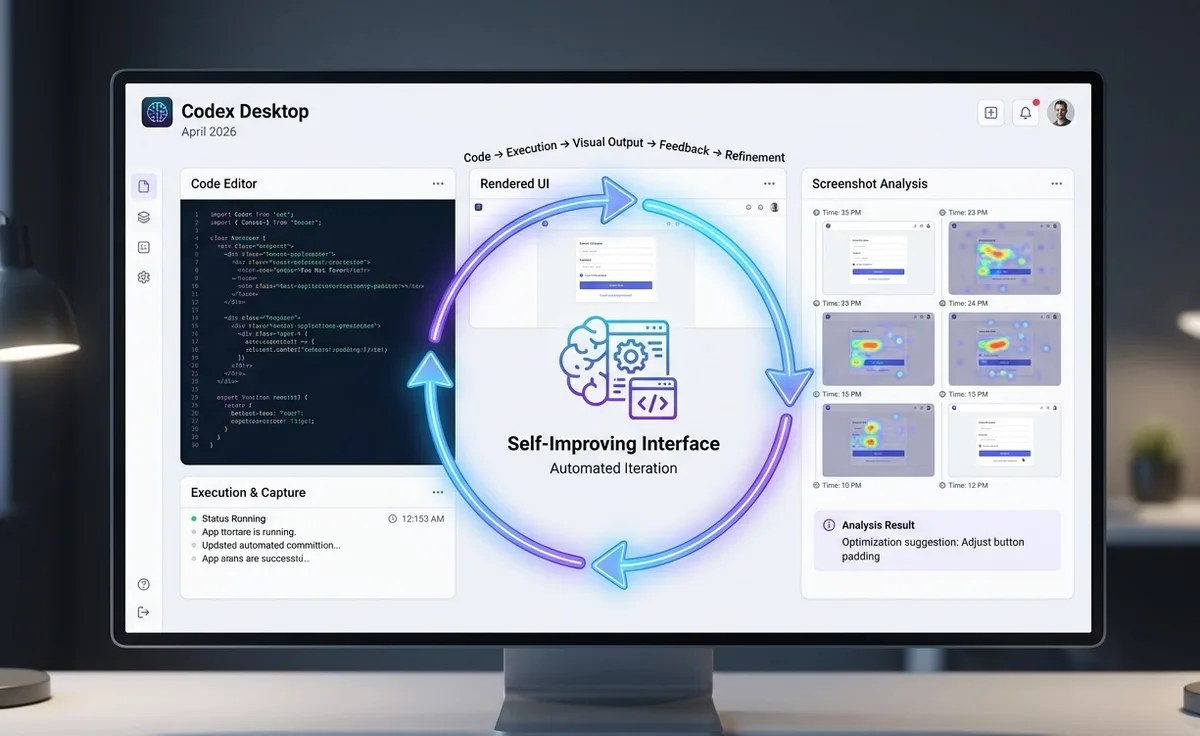

- Codex Desktop giới thiệu vòng lặp feedback trực quan vào tháng 4 năm 2026, cho phép nó xây, chạy, chụp màn hình, và lặp lại giao diện mà không cần rời khỏi ứng dụng.
- gpt-image-2 mang đến khả năng tạo ảnh 4K với độ chính xác text >99%, thay thế guesswork trong các workflow chỉ có CLI.
- Công cụ vision phát hiện lỗi contrast ảnh hưởng đến 8% người dùng và giải quyết 80%+ lỗi trực quan trước khi ship.
- Vòng lặp hoạt động trên game UI, SaaS dashboard, và A/B variant testing - tất cả từ một prompt đơn.
TL;DR
Hầu hết developer treat Codex như một terminal tool chỉ có text. Mental model đó vỡ ngay khi chất lượng UI trở nên quan trọng. Ứng dụng Codex Desktop - được mở rộng đáng kể vào ngày 16 tháng 4 năm 2026 - chạy một visual feedback loop liên tục: nó xây app của bạn, chụp screenshot, dùng vision để kiểm tra layout đã render, mô phỏng tương tác người dùng, tạo asset qua , và chỉnh sửa code dựa trên những gì nó thực sự thấy. Kết quả là một cách xây giao diện hoàn toàn khác.
Tại Sao Bản Nháp Đầu Luôn Thất Bại
Các benchmark AI coding truyền thống đo chất lượng output từ một prompt đơn. Chỉ số đó gây hiểu nhầm cho công việc UI. Bản nháp đầu từ bất kỳ LLM nào - kể cả model mạnh - thường có spacing không nhất quán, visual hierarchy bị vỡ, hoặc mobile layout sụp ở viewport hẹp như 320px. Model không thể thấy những gì nó đã xây, nên nó không thể sửa những gì nó không quan sát được.
Đây là vấn đề cốt lõi mà Codex Desktop giải quyết. Khi model có thể thấy giao diện đã render và đánh giá cái gì đang hoạt động và cái gì không, mọi thứ thay đổi hoàn toàn.
Vòng Lặp
Sự thay đổi mental model rất đơn giản: Codex Desktop không phải terminal tool được gắn thêm vision - đây là visual design loop với terminal bên trong.
Chu trình cốt lõi chạy như sau:
Prompt Codex với mục tiêu của bạn
Nó xây và chạy app locally
Screenshot được chụp ở nhiều viewport width
Vision review output đã render - hierarchy, contrast, spacing, text fit, hover state
Codex click qua các tương tác để test hành vi thực
Code được sửa dựa trên phát hiện trực quan
Screenshot trước/sau được so sánh để xác nhận cải tiến
Vòng lặp này mang lại ba lợi ích đo được. Thứ nhất, loại bỏ guesswork - Codex quan sát UI trực tiếp thay vì dự đoán những gì code sẽ tạo ra. Thứ hai, tự động phát hiện vấn đề; công cụ vision có thể đáng tin cậy flag các vấn đề contrast ảnh hưởng đến 8% người dùng có khiếm khuyết về thị giác màu, điều mà code review sẽ bỏ qua hoàn toàn. Thứ ba, A/B testing trở nên thực tế - Codex có thể prototype nhiều variant và chọn variant thắng dựa trên readability và user flow metric trước khi bạn commit vào hướng thiết kế nào.
Imagegen vs. Vision: Hai Công Việc, Một Vòng Lặp
Hai khả năng này bổ sung nhau, không thể thay thế nhau.
Imagegen tạo source material. Skill , được cung cấp bởi gpt-image-2 (ra mắt ngày 21 tháng 4 năm 2026), xử lý game portrait, product icon, background scene, UI placeholder, và labelled diagram. So với người tiền nhiệm gpt-image-1.5, gpt-image-2 hỗ trợ độ phân giải lên đến 4K (ổn định ở 2K), nâng độ chính xác text-rendering lên >99% trên Latin, CJK, và Arabic script (từ 90-95%), thêm O-series reasoning mode cho composition layout phức tạp, và hỗ trợ batch generation lên đến 10 ảnh mỗi lần gọi.
Vision đánh giá UI thực sự. Sau khi asset được tạo và tích hợp, Codex chụp screenshot của app đang chạy và dùng vision để phân tích hierarchy, spacing, contrast, và mobile responsiveness. Vấn đề được xếp hạng theo impact, rồi sửa và xác nhận trong iteration tiếp theo của vòng lặp.
Workflow hiệu quả: tạo asset với imagegen, đặt vào UI, chụp kết quả, dùng vision để tinh chỉnh. Tạo asset và review chất lượng nằm trong cùng một thread.
4 Workflow Trong Thực Tế
Game UI
Giao diện game phức tạp - HUD, inventory panel, mobile adaptation, sprite sheet. Codex bắt đầu bằng cách viết một PLAN.md có cấu trúc định nghĩa game loop, control, win state, và hướng trực quan. Sau đó nó dùng Playwright để chơi game trong live browser, đánh giá readability HUD, icon clarity, và mobile behavior như thể là một người chơi. Imagegen xử lý portrait, background, và UI sprite. Chạy vision review loop sớm giải quyết hơn 80% lỗi trực quan trước khi game ship, giữ người chơi tập trung vào gameplay thay vì chiến đấu với giao diện.
SaaS Dashboard
Với product UI và admin panel, Codex dịch design reference (screenshot, Figma frame, hoặc ghi chú ngắn) thành code map với design system hiện có của bạn - tái sử dụng token, component wrapper, và routing pattern thay vì tạo một styling system song song. Playwright sau đó xác nhận implementation so với reference của bạn ở nhiều breakpoint. Tích hợp Figma MCP đóng vòng tròn: pull Figma frame vào code, push app đang chạy trở lại Figma để designer review, và tiếp tục lặp.
A/B Testing Trước Khi Commit
Thay vì tranh luận thiết kế chủ quan, prompt Codex tạo ba visual variant, chụp screenshot trên desktop và mobile, và so sánh dựa trên readability và visual hierarchy. Nó chọn và áp dụng option hoạt động tốt nhất - quyết định dựa trên những gì AI thực sự thấy, không phải những gì nó dự đoán.
Trích Xuất Art Bible
Khi thiết kế được hoàn thiện, Codex có thể trích xuất các quy tắc nền tảng - palette, typography scale, spacing system, interaction pattern - thành một art bible tái sử dụng được. Các thử nghiệm trở thành design language. Các trang trong tương lai giữ nhất quán mà không cần cross-reference thủ công.
Master Prompt Đáng Lưu Lại
Prompt mơ hồ tạo ra kết quả không nhất quán. Cấu trúc này hoạt động với hầu như mọi visual project:
Dùng Codex Desktop như một visual builder. Mục tiêu: [mô tả project của bạn]. Dùng imagegen và vision theo cặp: (1) xây phiên bản tối giản, (2) chạy locally, (3) chụp screenshot, (4) kiểm tra bằng vision, (5) click qua flow, (6) sửa vấn đề, (7) chụp lại screenshot, (8) A/B test variant, (9) dùng imagegen cho asset, (10) tóm tắt thay đổi và trích xuất design rule.
Các bổ sung quan trọng làm prompt này hiệu quả: yêu cầu vision sign-off trước khi tuyên bố task xong, chỉ định kiểm tra cả desktop và mobile, và yêu cầu Codex đóng vai cả product designer lẫn QA expert đồng thời.
Giới Hạn Cần Lưu Ý
Giới hạn | Chi tiết |
|---|---|
Transparent PNG | gpt-image-2 không hỗ trợ transparent background - dùng gpt-image-1.5 hoặc post-process |
Rate limit | 250 ảnh mỗi phút (IPM) trên API; workflow batch cần pacing |
Chi phí sử dụng | Image turn tiêu thụ giới hạn ChatGPT plan nhanh hơn text turn 3-5 lần |
In-app browser | Không có auth flow, signed-in page, cookie, hay extension |
Computer use | Chỉ macOS khi ra mắt; không khả dụng ở EEA, UK, hay Thụy Sĩ |
Remote devbox | Kết nối SSH vẫn được gán nhãn alpha |
Giá API cho gpt-image-2 mỗi ảnh 1024x1024: Low ~/bin/bash.011, Medium ~/bin/bash.042, High ~/bin/bash.211. Với workflow batch nặng, đặt OPENAI_API_KEY để chuyển sang billing API trực tiếp thay vì tiêu dùng allocation plan của bạn.
Tiếp Theo Là Gì
Mở rộng ngày 16 tháng 4 là một cột mốc, không phải đích đến. Rollout computer use cho EU và UK, memory và context-aware suggestion cho tài khoản Enterprise và Education, và SSH devbox đạt GA đều nằm trong roadmap gần hạn. Hệ sinh thái plugin (90+ tích hợp bao gồm Atlassian Rovo, CircleCI, GitLab Issues, và Microsoft Suite) cho thấy Codex đang trở thành distribution layer cho các team workflow tái sử dụng được - không chỉ là coding assistant cá nhân.
Nếu chất lượng UI ảnh hưởng đến user engagement của sản phẩm, visual design loop là điểm khởi đầu đúng đắn. Mở Codex Desktop, áp dụng master prompt trên, và tự đo sự khác biệt về tốc độ iteration.
Via: OpenAI, Tài liệu Codex app, Codex Blog, SmartScope.
Đạo hữu là phàm nhân, tu tiên giả
... hay AI cào nội dung?
Tất cả nội dung tại đạo quán đều miễn phí. Đạo hữu chỉ cần nhập email của mình để đọc tiếp. Nói KHÔNG với Spam. Huỷ subcribe lúc nào đạo hữu thích.
nếu không muốn nhận newsletter thì có thể nhập mail phụ